You can control which payment methods customers see during the returns and exchanges process by configuring the Shopify payment page settings within Return Prime.
Why this matters
This setting allows you to:
Show only preferred payment methods during exchanges
Hide unsupported or undesired options (e.g., Cash on Delivery)
Ensure consistency with your Shopify store’s payment configuration
Steps to Configure Payment Methods
1. Navigate to Settings
Go to Return Prime Dashboard
Navigate to Settings → Policies → Configure Shopify Payment Page
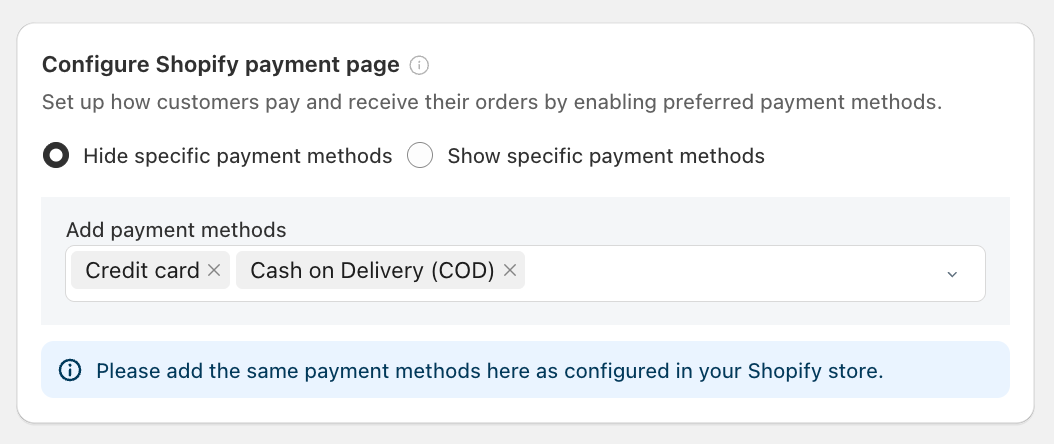

2. Choose Your Preference
You will see two options:
Hide specific payment methods
→ Select this if you want to exclude certain payment methodsShow specific payment methods
→ Select this if you want to allow only selected payment methods
3. Add Payment Methods
In the “Add payment methods” field:
Select the payment methods you want to show or hide
Example:
Credit Card
Cash on Delivery (COD)
4. Ensure Shopify Consistency
Make sure the same payment methods are already enabled in your Shopify store
Only supported methods from Shopify will work during checkout
Important Notes
All exchange payments are processed via Shopify Checkout
No additional payment gateway setup is required in Return Prime
Customers will only see the payment methods you configure here
This setting only impacts the returns and exchange flow, not your main storefront checkout
Example Use Cases
Disable COD for exchanges
→ Use Hide specific payment methods and select CODAllow only prepaid methods
→ Use Show specific payment methods and select Credit/Debit Cards, UPI, etc.
Was this article helpful?
That’s Great!
Thank you for your feedback
Sorry! We couldn't be helpful
Thank you for your feedback
Feedback sent
We appreciate your effort and will try to fix the article