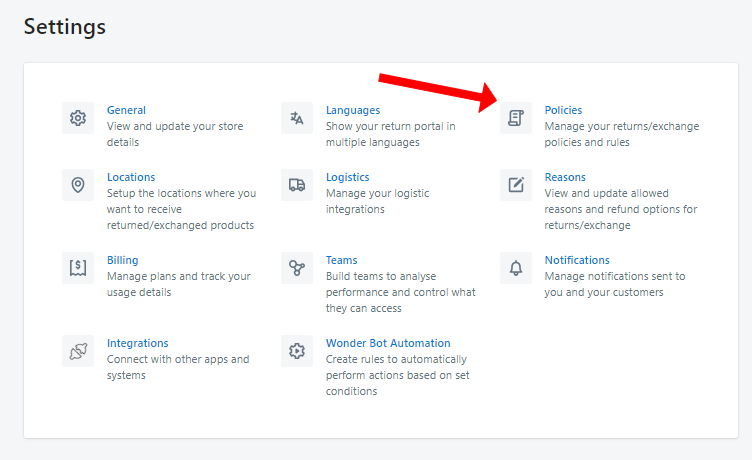
1. Open the Return Prime app and navigate to the settings menu.
Access the "Policies" section within the settings.
Scroll down to find the "Exchange Rules" section.
Check the box to "Exchange with other products" in this section.

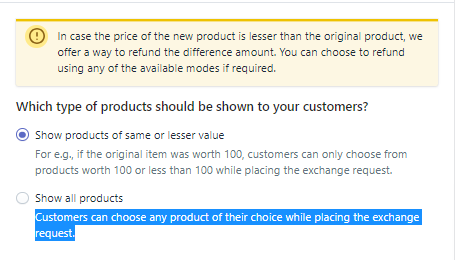
After this, you can select your preferred option of products you want to be shown to your customer:
Show products of the same or lesser value:
For e.g., if the original item was worth 100, customers can only choose from products worth 100 or less than 100 while placing the exchange request.
Show all products:
Customers can choose any product of their choice while placing the exchange request.
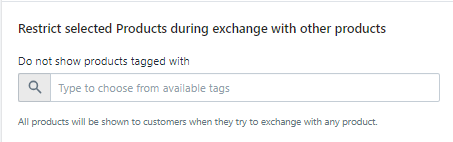
Additionally, you can also restrict product available for this exchange by inputting the tag on such product in the last field of the section.
Remember to click the "Save" button to confirm your settings.


Was this article helpful?
That’s Great!
Thank you for your feedback
Sorry! We couldn't be helpful
Thank you for your feedback
Feedback sent
We appreciate your effort and will try to fix the article